
Release Suno
in one click.
The AIMD browser extension turns any Suno song page into a finished release. Audio, cover art, title, artist, lyrics and ISRC, all auto-imported. Spotify, Apple Music and 20+ stores, one click away. $2 per AI release, 100% royalties, forever. Live now on the Chrome Web Store for Chrome, Atlas, Dia and every other Chromium browser.
Live in
every browser
that ships AI.
One Chrome Web Store listing covers every Chromium-based browser: Chrome, Edge, Brave, Arc, and the agentic browsers Atlas and Dia, all live today. Safari clears review next; Firefox follows on Mozilla Add-ons.
◉ Also coming to
- FirefoxMozilla Add-onsComing soon
Waiting on Safari or Firefox? Make an AIMD account and we'll email the link the moment each listing goes live.
Four clicks.
Two minutes.
The AIMD Suno extension is designed to take a finished song from the Suno player to live on Spotify, Apple Music and 20+ stores in under two minutes, with zero copy-pasting.
- 01
Add to your browser
Install from the Chrome Web Store. It works in Chrome, Atlas, Dia and every Chromium browser. The extension only ever runs on suno.com and aimusicdistro.com, never anywhere else.
- 02
Open a Suno song
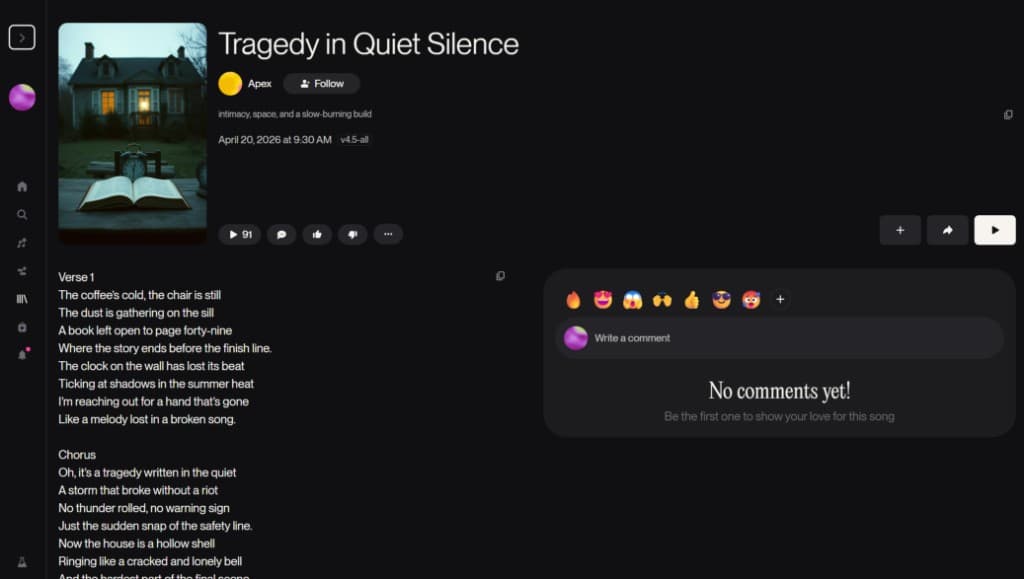
Go to your finished Suno song page. The icon lights up the moment AIMD detects audio, art, title, artist and lyrics.
- 03
Click the icon
AIMD opens in a popup with the song already imported. ISRC and UPC are generated automatically. Review the metadata in five seconds.
- 04
Send to distro
One more click. AIMD delivers to Spotify, Apple Music, Amazon Music, YouTube Music, Tidal, Deezer, Pandora, SoundCloud and 20+ stores in 24–72 hours. $2, once, 100% royalties.
Everything from
the song page.
Automatically.
The extension reads the Suno page you're on and pre-fills every distribution field. You don't retype the title. You don't re-upload the cover. You don't paste lyrics. You don't generate an ISRC.
- Audio file (WAV / MP3)
- Cover art (3000×3000)
- Song title
- Artist name
- Full lyrics
- Generation model + version
- Auto-generated ISRC
- Auto-generated UPC
The extension never touches a tab outside suno.com and aimusicdistro.com. No background scraping, no analytics pings, no third-party transmission.
Extension
questions.
Is there a Chrome extension for Suno?
Yes. Suno to Spotify (the AIMD-powered extension) is live on the Chrome Web Store. It reads any suno.com song page and hands the audio, cover art, title, artist and lyrics off to AIMD for distribution to Spotify, Apple Music and 20+ stores in one click. The same listing installs on Edge, Brave, Arc, Atlas and Dia.
How do I distribute a Suno song to Spotify?
Install the AIMD browser extension, open your finished Suno song page, click the AIMD icon in your toolbar, and click 'Send to distro'. AIMD generates the ISRC and UPC, then delivers to Spotify, Apple Music, and 20+ stores within 24–72 hours. One-time $2 per AI release, 100% royalties to you.
Does the AIMD extension work in Safari?
The Safari build is in review at the Mac App Store. Today the extension is live via the Chrome Web Store for every Chromium-based browser: Chrome, Edge, Brave, Arc, Atlas and Dia. Firefox is on the roadmap.
Does the AIMD extension work in Atlas, Dia, or Firefox?
Atlas (OpenAI's agentic browser) and Dia (The Browser Company's agentic browser) are Chromium-based, so the extension works in both today. Install it straight from the Chrome Web Store. Firefox is coming soon; the Manifest V3 build ships to Mozilla Add-ons when it clears review.
How much does the AIMD extension cost?
The extension is free. Distribution is $2 once per AI release and $1 once per human release, paid in the AIMD app. No subscription, no revenue share, 100% royalties to the artist forever.
What does the AIMD extension import from a Suno page?
Audio file, cover art, title, artist name, and full lyrics. The extension also generates an ISRC and UPC automatically so the release is ready to ship to stores without any manual metadata entry.
Is the AIMD Suno extension safe?
Yes. The extension only requests access to suno.com and the AIMD app domains. It does not read any other site, does not run on background tabs, and does not transmit data to third parties. See our privacy policy at https://aimusicdistro.com/privacy.
◉ The extension is live
Set up AIMD now.
The extension signs you in automatically.
The extension reuses your open AIMD session. There's no second login. Install it from the Chrome Web Store, make an account, and you're one click from releasing a Suno song.